Management dashboards, one per reader
The month at a glance, with what needs attention first. The CEO, the board and each department head can open on a dashboard of their own, built from the same figures.
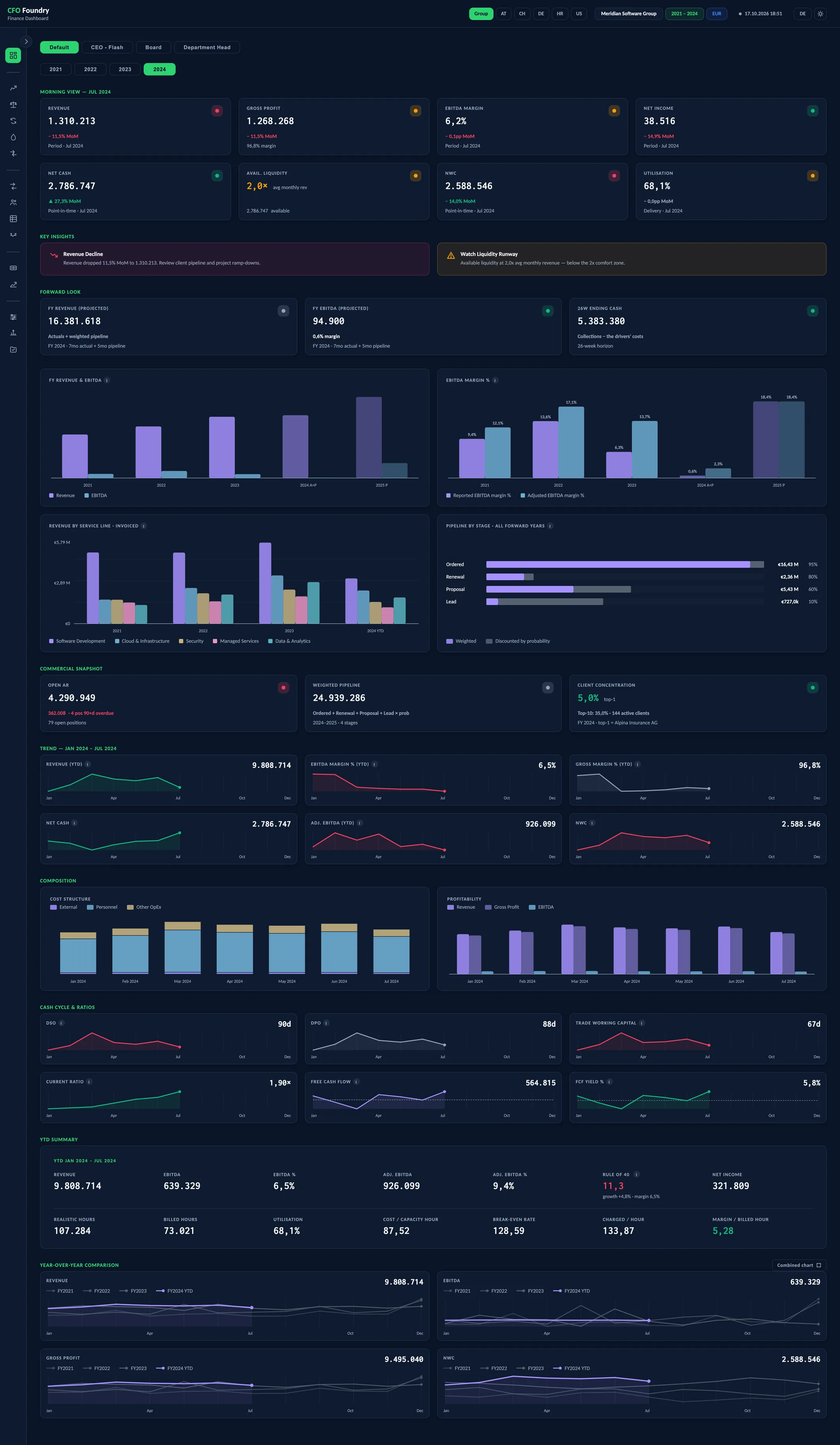
- Morning View
- Key insights
- Forward look
- Commercial snapshot
- Trend
- Composition
- Cash cycle & ratios
- YTD summary
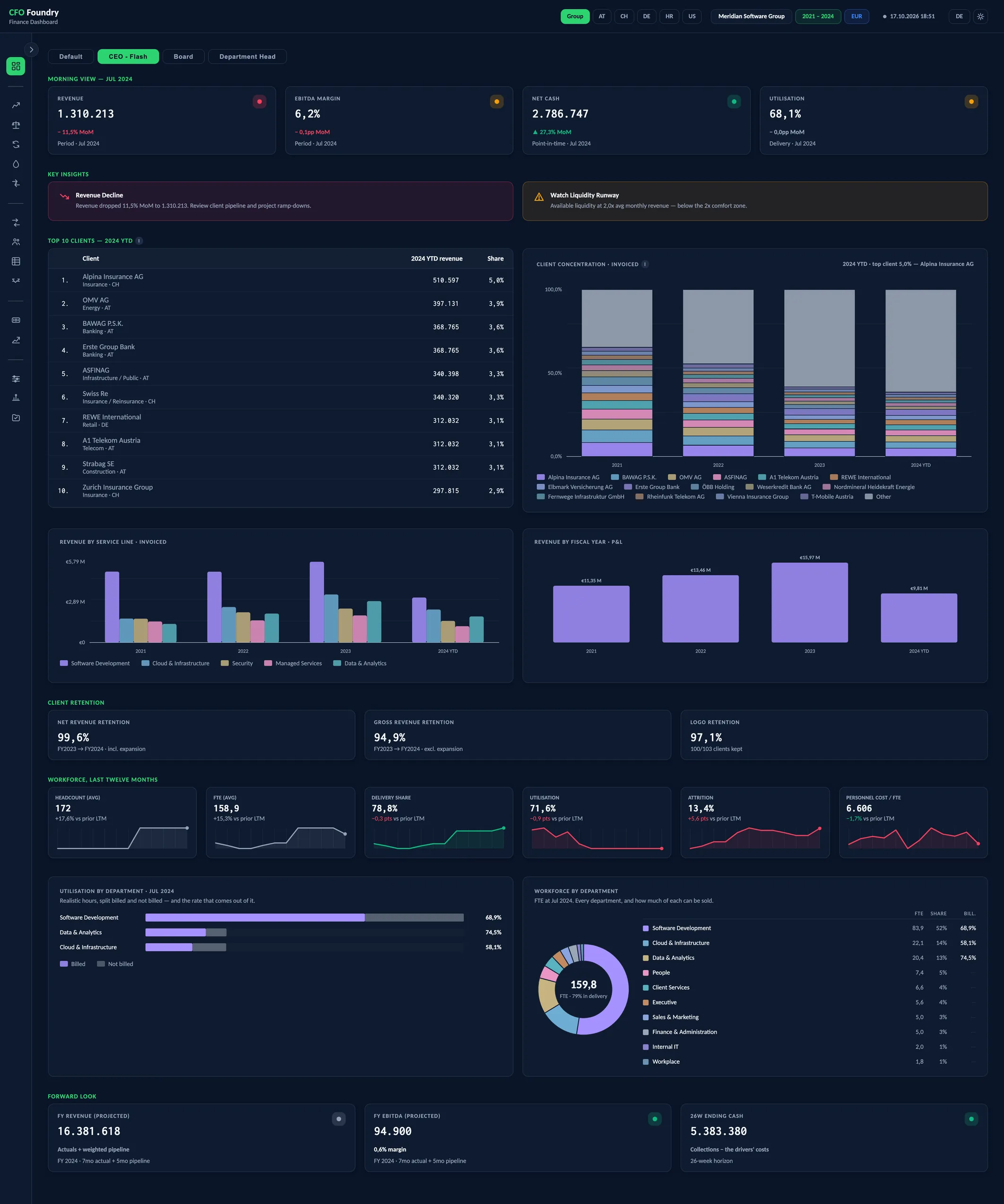
- Morning View
- Key insights
- Top 10 clients
- Client retention
- Workforce, last twelve months
- Forward look
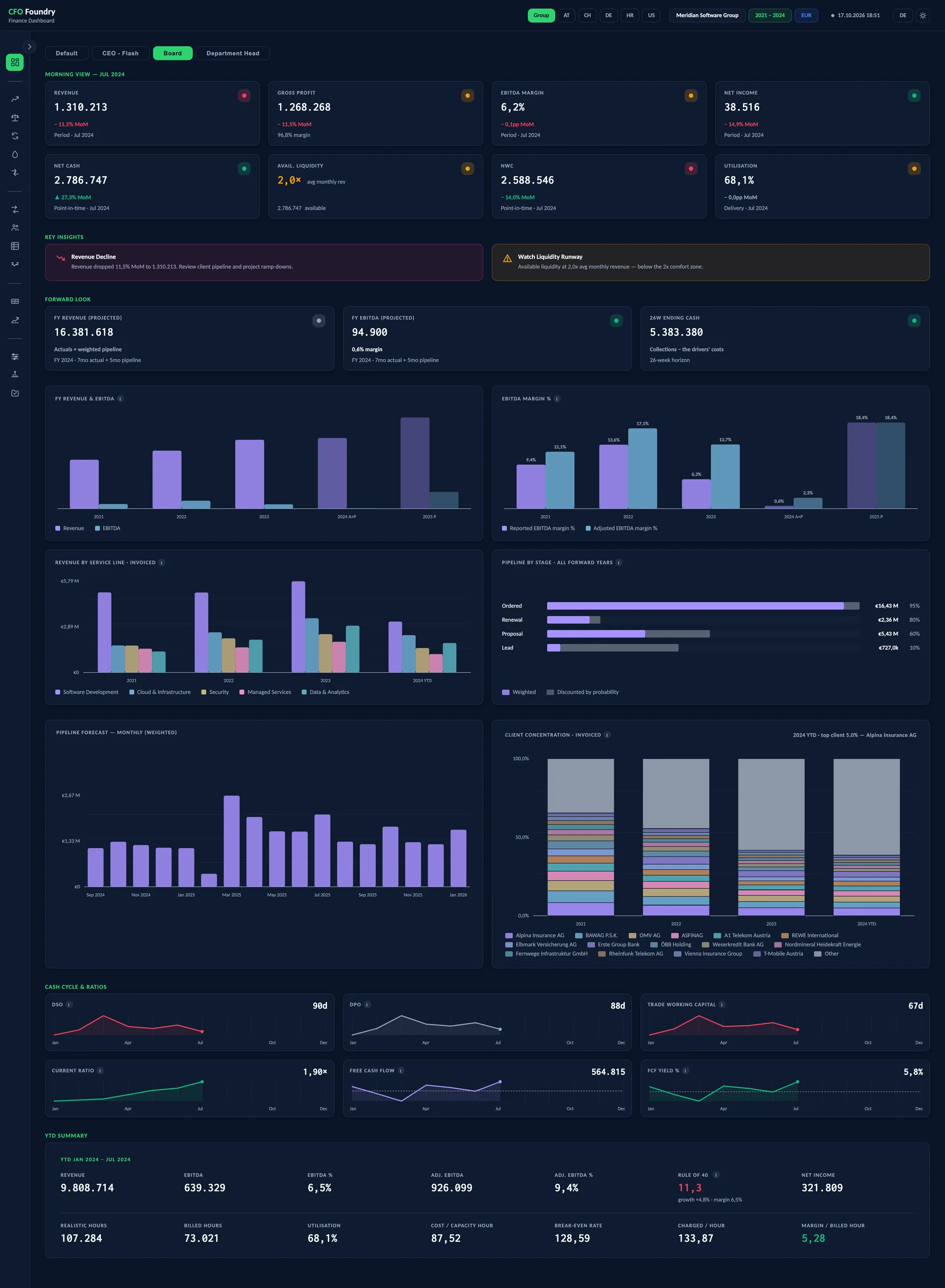
- Morning View
- Key insights
- Forward look
- Cash cycle & ratios
- YTD summary
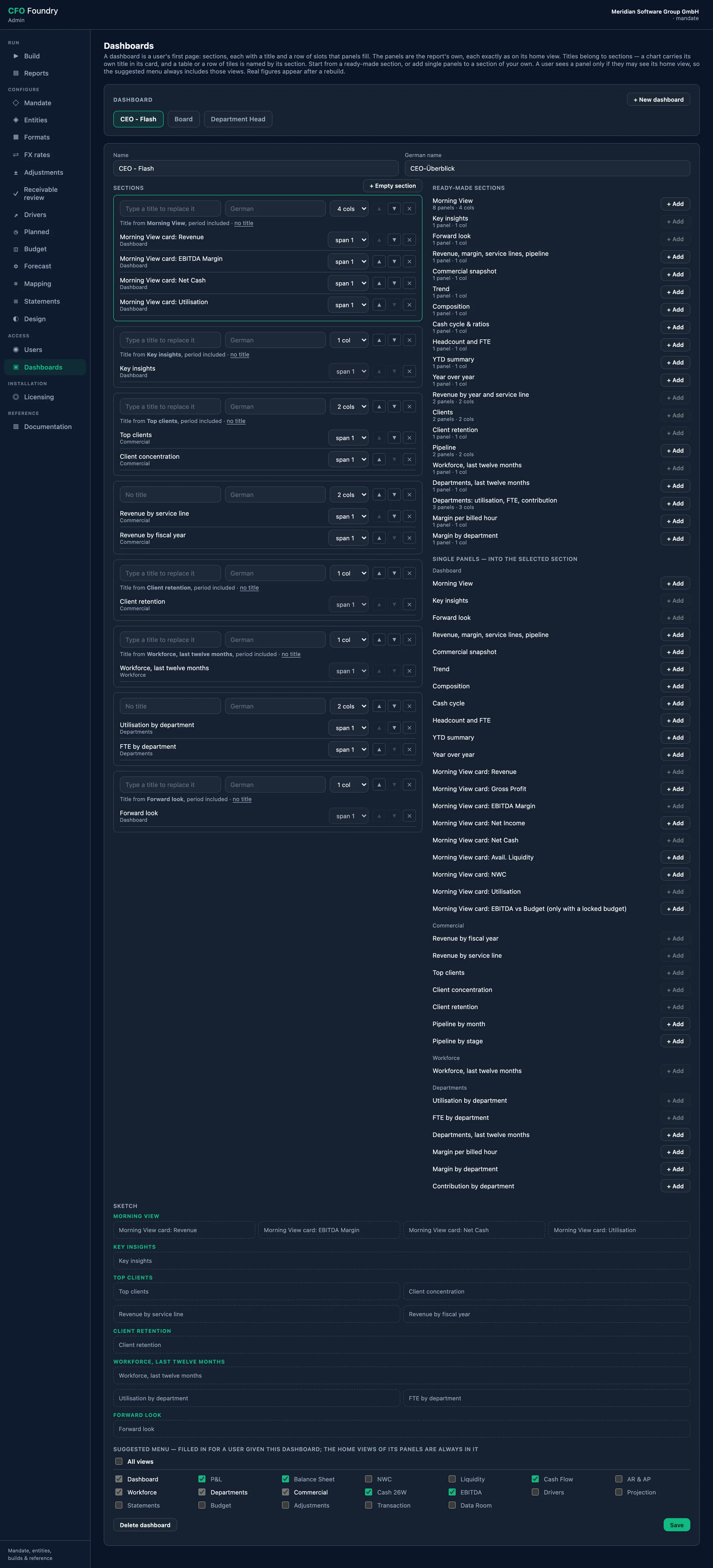
- Access
- Dashboards
Meridian is a fictional demo company. All figures are sample data.
Key questions
Who sees what?
Each reader opens on the dashboard set for them: a CEO flash, a board view, a department head's view. Every panel on it is one the report already has.
How did the month go?
Eight cards show revenue, gross profit, EBITDA margin, net income, net cash, available liquidity, net working capital and utilisation for the latest month, each with its change on the month before.
What needs attention first?
Key insights sit directly under the cards, the most severe first: a sharp fall in revenue, a thin margin, a short liquidity runway, a jump in working capital.
The Morning View, and a dashboard per reader
Eight KPI cards with traffic-light status, month-on-month change and twelve-month trends. Each reader can have a dashboard of their own, such as a CEO flash or a board view, built from the same figures.
Dashboard
- Revenue
- Gross Profit
- EBITDA Margin
- Net Income
- Net Cash
- Avail. Liquidity
- NWC
- Utilisation
- FY Revenue (projected)
- FY EBITDA (projected)
- 26W Ending Cash
- Open AR
- Weighted Pipeline
- Client Concentration
- Revenue (YTD)
- EBITDA Margin % (YTD)
- Gross Margin % (YTD)
- Adj. EBITDA (YTD)
- DSO
- DPO
- Trade working capital
- Current Ratio
- Free Cash Flow
- FCF Yield %
- EBITDA
- EBITDA %
- Adj. EBITDA
- Adj. EBITDA %
- Rule of 40
- Realistic hours
- Billed hours
- Cost / capacity hour
- Break-even rate
- Charged / hour
- Margin / billed hour
- FY revenue & EBITDA
- EBITDA margin %
- Revenue by service line · invoiced
- Pipeline by stage · all forward years
- Cost Structure
- Profitability
Platform
- Dashboards per Reader: A dashboard per reader, such as a CEO flash or a board view, built from the same figures.
Your Own Dashboards
In the operator app, a dashboard is assembled from sections. A section is ready-made, such as the Morning View or client retention, or holds single panels the report already has: one Morning View card, the top clients, the pipeline, utilisation by department. Each panel looks exactly as it does on its own view.
The demo group carries a CEO Flash, a Board and a Department Head dashboard beside Default. Without logins, they appear as tabs on the dashboard. With logins, each reader opens on their own, and a panel from a view they are not granted is left out of their copy.
Default: the Morning View and its traffic lights
The dashboard opens on the Morning View: eight cards for the latest month. Revenue, gross profit, EBITDA margin and net income are the month's own figures. Net cash and net working capital are the balances at the month-end. Available liquidity is net cash plus the undrawn part of the credit lines, shown as a multiple of average monthly revenue.
Each card carries a status dot in green, amber or red, and the change on the month before takes the same colour.
Once a budget for the year is locked, an EBITDA vs Budget card follows the EBITDA margin, for the month and the year to date. It can be placed on any custom dashboard, and without a locked budget it is left out.
Key insights and the forward look
Key insights are written from the month's figures, each with the amount it refers to: a sharp move in revenue or in net working capital, a thin or negative EBITDA margin, a short liquidity runway, net cash falling month after month, low utilisation, a gross margin that dropped. Red comes before amber. Three are shown, and Show more opens the rest.
With a pipeline in the data, a forward look follows: the projected revenue and EBITDA for the current fiscal year, and the cash at the end of the 26-week forecast.
The Board Deck, a PowerPoint written with every group build, states the same month: its cards and key insights are the dashboard's own, followed by the P&L, cash and the 26-week forecast, working capital and people.
Trends, ratios and the year to date
Below the cards, the dashboard runs from the month to the year:
- Charts of revenue and EBITDA by fiscal year, the EBITDA margin, revenue by service line and the pipeline by stage
- Twelve-month trend lines and the cost structure, month by month
- DSO, DPO, trade working capital, current ratio, free cash flow and free cash flow yield
- A year-to-date summary: revenue, EBITDA, adjusted EBITDA, the Rule of 40, net income, and the hours, rates and margin per billed hour
The year-over-year cards state a flow, such as revenue, as the sum of the year to date, and a balance, such as net working capital, as its latest month-end.
Terms
- Morning View
- The eight cards at the top of the dashboard, for the latest month reported.
- MoM
- Month over month: the change on the month before.
- Available Liquidity
- Net cash plus the undrawn part of the credit lines.
- Utilisation
- The share of the delivery departments' sellable time that is billed.
- Rule of 40
- Revenue growth on the same months of the prior year plus the EBITDA margin, both year to date.
- YTD
- Year to date: from the start of the fiscal year to the month shown.
Data sources
- The monthly trial balance of each entity and the account mapping
- The credit lines entered in the mapping, for available liquidity
- Headcount and hours exports, for utilisation and the rates
- The revenue history and the pipeline, for the service lines and the forward look
- The EBITDA adjustments, for adjusted EBITDA
- The locked budget of the year, for the EBITDA vs Budget card
FAQ
Which KPIs belong in a monthly management report?
For a services company: revenue, gross profit, EBITDA margin and net income for performance, net cash and available liquidity for cash, net working capital for the cash the operations tie up, and utilisation for the use of the team. The dashboard opens on exactly these eight.
How does the dashboard show whether a figure is healthy?
Each card carries a status light in green, amber or red, set for an IT services company. When a figure such as the EBITDA margin turns weak or negative, a key insight names it with its amount.
How current is the dashboard?
It shows the latest month with a trial balance in the data room. A new month's trial balance and a rebuild bring it up to date.
Get in touch
Describe your situation in a few lines. A reply typically follows within 1–2 business days.
To the Contact Form