The data room and its checklist
A folder structure that follows a sell-side checklist, with every file CFO Foundry produces filed into it and a count of what is still missing.
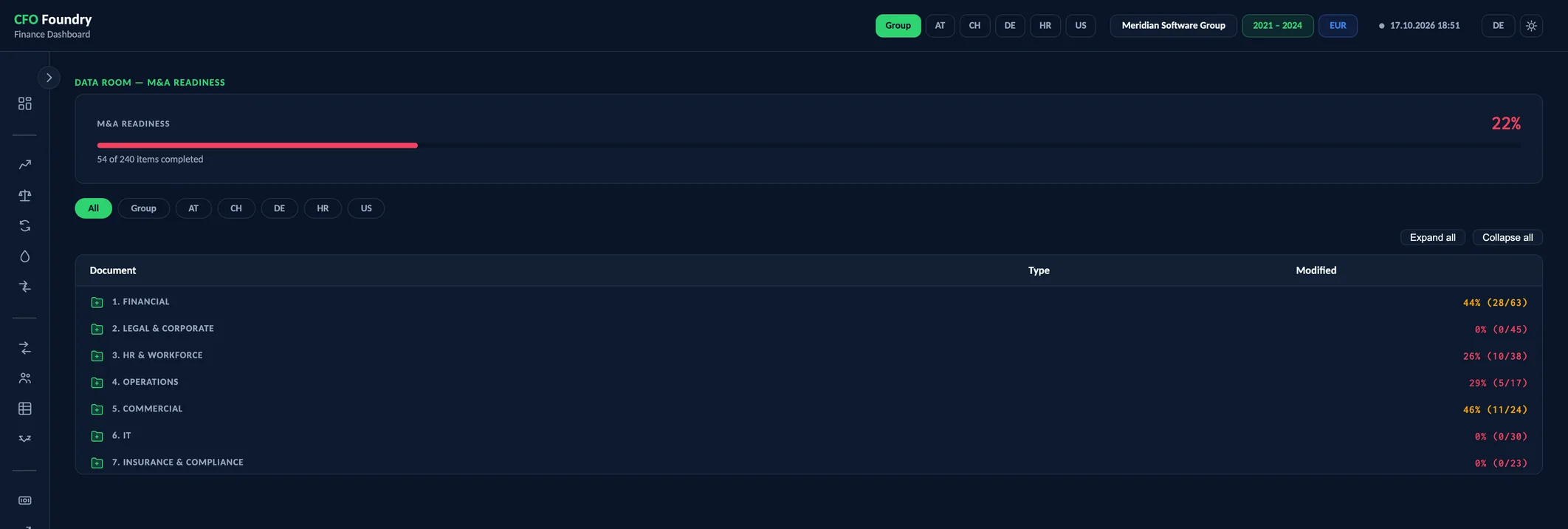
- 1 KPI
- DATA ROOM — M&A READINESS
Meridian is a fictional demo company. All figures are sample data.
Key questions
What belongs in the data room?
Seven sections, from financial to insurance and compliance, with 43 numbered items, each marked required, recommended or optional.
How complete is it?
M&A readiness counts the items that hold a file, entity by entity and for the group, against the full checklist.
Where is each document?
The Data Room view lists every file under its item, with its type and date, and opens it from there.
The virtual data room checklist
A data room in seven sections and more than 40 items. Files CFO Foundry produces are detected and linked, and the completion share shows what is still missing.
Data Room
- M&A Readiness
- Data room — M&A readiness
Seven sections, numbered once
The data room follows a standard sell-side checklist. Each section has a folder for every entity and one for the group, and each item a numbered folder of its own. Adding an entity in the operator app creates its full set.
- 1 Financial: financial statements, management accounts, trial balances, general ledger, cost centres, quality of earnings, tax, transfer pricing, open items, revenue history
- 2 Legal and corporate: corporate structure, articles and agreements, board minutes, key contracts, IP and licences, litigation, real estate and leases
- 3 HR and workforce: employee overview, headcount, contracts, incentive schemes, org chart, attrition, pensions and benefits
- 4 Operations, 5 Commercial, 6 IT, 7 Insurance and compliance: from hours and utilisation, top customers and the pipeline to security, insurance policies and data protection
An item keeps its number for good. A new item takes the next free number, so a reference such as 1.7 means the same folder throughout a process.
What the build files into it
The data room is where CFO Foundry reads the company's exports and where it writes its own output. Every build writes the workbooks back into their items, so they always match the reports:
- Management accounts: the P&L, balance sheet, working capital and cash flow per year, the transaction bridge and an index of every generated file with links
- Quality of earnings: the schedule of adjustments
- The workforce analysis and the revenue workbook
- The Board Deck and the M&A deck, in the group's folder
Statutory accounts, contracts, policies and certificates are added by hand into the matching folder.
Readiness counts what is in the room
An item counts as present when its folder holds a file. The readiness share is the number of items present, per entity and for the group, over the whole checklist, and each section shows its own share.
Required items are marked, and every empty item shows in red. An entity with no adjustments has no quality of earnings workbook, so that item stays open until there is one.
The view filters by entity and group, and opens or closes every section at once.
A folder of ordinary files
The data room is a folder of ordinary files, kept with the company's reports. The reports link into it with relative paths, so both stay side by side and every download button opens the workbook in the room.
Which files a buyer receives, and when, is the seller's decision. The transaction workbook carries its Issues sheet only when the company chooses to disclose it. The budget stays out of the room on the same terms: once disclosed, the P&L workbook carries the budget columns and a Budget sheet, and a locked budget for the coming year has a workbook of its own.
Terms
- Virtual Data Room (VDR)
- The organised set of documents a buyer reviews in due diligence.
- M&A Readiness
- The share of checklist items that hold a file, per entity and for the group.
- Required, Recommended, Optional
- The priority each item carries: 16 required, 20 recommended and 7 optional.
Data sources
- The data room folder: every file in every item, for each entity and the group
- The checklist that ships with CFO Foundry: sections, items and their priority
- The entities of the group, each with its own folders
FAQ
Which documents are needed for due diligence?
Typically financial statements, management accounts and trial balances, tax and transfer pricing, the corporate structure and key contracts, employee data and contracts, customer contracts, IT and security, insurance and data protection. The checklist names 43 items in seven sections.
How is a data room structured?
In numbered sections and items, so every document can be cited by its number. Here each item has a folder per entity and, where it applies, one for the group.
When should a data room be prepared?
Well before a sale process starts. With CFO Foundry the financial part fills with every monthly build, and the readiness share shows what remains.
Get in touch
Describe your situation in a few lines. A reply typically follows within 1–2 business days.
To the Contact Form